

Enterprise application integration (EAI) is the practice of connecting a company’s business applications, such as ERP, CRM, eCommerce, POS and accounting, so they share data and trigger each other’s processes without manual re-entry. Any organization that runs more than a handful of systems needs it, because every new application adds another data silo. In 2026 most new EAI projects combine APIs, event notifications (webhooks) and a managed integration platform (iPaaS) rather than a single on-premises bus.
This guide explains how EAI works, the main integration patterns, what typical data flows look like, how to choose an approach and how to measure whether a project succeeded. If you want to streamline operations across several systems, start here.
What is Enterprise Application Integration (EAI)?
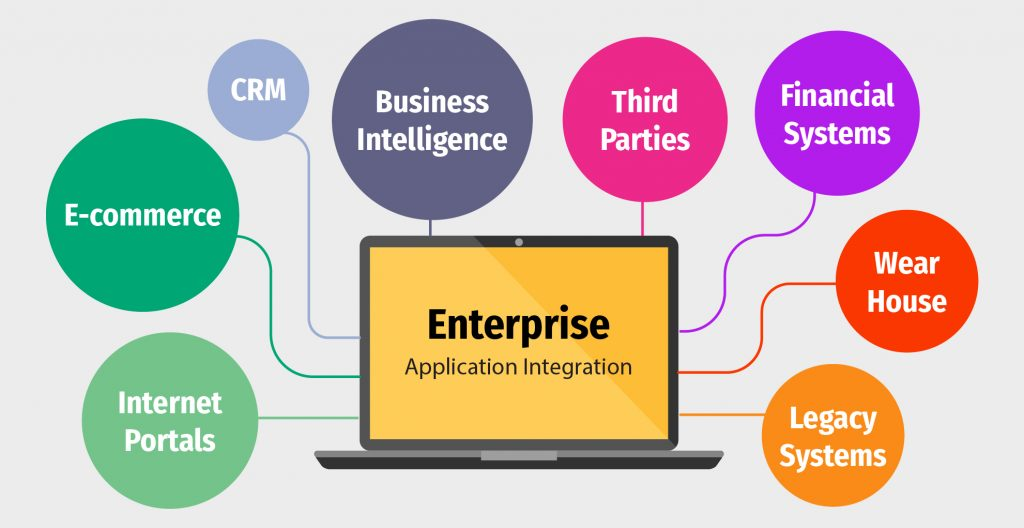
Enterprise Application Integration (EAI) is the set of technologies, patterns and processes that let separate software applications inside an organization exchange data and coordinate business processes. Instead of each team keying the same customer, order or invoice into several systems, an integration layer moves and transforms that data automatically.
The main objectives of EAI are to:
- Keep data consistent across systems (one version of each customer, product, price and order).
- Make data available sooner, in real time or on a schedule that matches the business need.
- Remove manual work such as re-keying orders or exporting and importing spreadsheets.
- Scale as new applications are added, without rebuilding every existing connection.
EAI usually relies on an integration layer, often called middleware, that sits between applications. The applications keep their own functions; the middleware handles connectivity, data mapping, routing, error handling and monitoring.
Enterprise application integration patterns
EAI can be implemented with several architectural patterns. Most companies end up with a mix, so it helps to know the strengths and limits of each.
Point-to-point integration
Each pair of applications is connected directly, usually with custom code or a vendor plug-in. It is quick to build for one or two connections and works for small businesses with very few systems. The drawback is that connections multiply with every new application: each system must know the format and API of every other system it talks to, and a change in one breaks several links.
Hub-and-spoke and enterprise service bus (ESB)
A central hub receives messages from each application, transforms them and routes them to the right destination, so each application connects only to the hub. An enterprise service bus (ESB) is the best-known version of this idea: IBM describes an ESB as an architectural pattern in which a centralized software component performs integrations between applications. Centralizing the logic simplifies maintenance and governance, but the hub or bus can become a bottleneck and usually needs a specialist team to run it.
Message queues and event-driven integration
Applications publish events (“order created”, “stock changed”) to a message broker or queue, and other applications subscribe to the events they care about. Senders and receivers are decoupled: if one system is offline, messages wait in the queue instead of being lost. Many SaaS platforms now expose webhooks for this purpose; for example, SAP Business One added webhooks to its Service Layer in version 10.0 FP 2602, and HubSpot and Salesforce offer webhook and change-event subscriptions on their CRM records. Read more in our guide to webhooks.
APIs and microservices
Small, independent services expose their functions through APIs, typically REST with JSON (older enterprise systems still use SOAP with XML). API-led integration makes each capability reusable, and microservices can be deployed and scaled independently. It requires solid API management, versioning and security.
Integration platform as a service (iPaaS)
An iPaaS delivers the integration layer as a cloud service: connectors to common applications, mapping and transformation tools, scheduling, queues and monitoring. IBM describes iPaaS as a suite of cloud-based tools used to integrate applications, systems and data sources, and characterizes its architectural style as distributed, API-led and event-driven. iPaaS reduces the infrastructure a company must run itself, which is why it is now the default choice for connecting cloud applications. See what is iPaaS for a deeper comparison. To compare products, see iPaaS vendors compared and the best ERP integration software.
Why do organizations need enterprise application integration?
Businesses run many applications, such as CRM, ERP, POS, eCommerce and accounting, and out of the box they don’t communicate with each other. Valuable information ends up in separate data silos, and processes from data entry to reporting stay manual, which wastes time and causes errors.
Enterprise application integration lets these applications share data and functions, which leads to:
- Faster order-to-cash and procure-to-pay cycles, because documents flow between systems automatically.
- Up-to-date stock, prices and customer data on every sales channel.
- Reporting from consistent data instead of reconciled spreadsheets.
- The ability to add or replace an application without rebuilding every process around it.
Typical EAI data flows
Most ERP and commerce integration projects include some of these flows:
| Flow | Source | Destination | Typical trigger |
|---|---|---|---|
| Products, prices and stock | ERP | eCommerce stores, marketplaces, POS | Change in ERP or a schedule |
| Orders | eCommerce, marketplace, POS | ERP / accounting | New order event |
| Customers | CRM or eCommerce | ERP | New or updated customer |
| Shipments and tracking | ERP or warehouse system | eCommerce / marketplace | Delivery posted |
| Invoices and payments | ERP | Accounting, CRM | Invoice or payment posted |
The components of enterprise application integration
EAI combines three groups of capabilities: data integration, application communication and business process management.
Data integration
Data integration consolidates data from various sources into a unified, accurate view. In EAI this means mapping fields between systems (for example, a Shopify product to an ERP item), validating data before it is written, and handling duplicates. For analytics, the Extract, Transform, Load (ETL) process and a data warehouse complement EAI by storing integrated data for reporting. Read more about data integration tools.
Application communication
Application communication lets applications call each other’s functions and exchange messages. It uses APIs, middleware, message brokers and standard protocols. REST over HTTP with JSON is the most common style today, while SOAP with XML remains in many established enterprise systems. Event notifications (webhooks) reduce the need to poll APIs repeatedly.
Business process management
Business process management (BPM) in EAI orchestrates multi-step workflows that span systems, for example “when an order is paid, create the sales order in the ERP, reserve stock, then send the tracking number back to the store.” Process modeling makes the flow explicit, and workflow automation executes it, with retries and alerts when a step fails.
EAI use cases
Integration lets services, tools and systems work together to complete operational tasks. Here are three common examples:
Order processing
Connect eCommerce platforms, inventory systems, the ERP and the CRM. When a customer places an order, inventory is updated automatically, order details go to fulfillment, and the customer receives status notifications throughout the process.
Marketing automation
Connect marketing tools to the CRM and the ERP so campaigns use current customer and purchase data, and marketing invoices flow into financial records without re-keying.
Project management
Connect HR, project management and finance systems so you can schedule projects, assign tasks, track progress and report project costs in one place.
How to choose an EAI approach: a checklist
Before choosing a pattern or a vendor, answer these questions:
- How many systems, and how many will you add? Two or three stable systems can live with point-to-point; more than that usually justifies a hub, iPaaS or event-driven design.
- Which data must be real time? Stock and orders often need near real-time sync; finance postings may be fine on a schedule.
- What do your systems expose? Check each application’s APIs, webhooks, rate limits and on-premises or cloud deployment.
- Where are the transformations? List the field mappings, units, tax and currency rules. Complex mapping favors a platform with a visual or configurable mapping layer.
- How will failures be handled? Ask for retries, queues, alerts, and a way to see which record failed and why.
- Who will run it? An in-house ESB needs a specialist team; an iPaaS or a managed integration service shifts that work to the vendor.
- What is the total cost? Compare licence or subscription, implementation, and maintenance when APIs change, not just the first-year price.
The challenges of enterprise application integration and how to overcome them
Enterprise application integration offers many benefits, but implementing and maintaining it can be complex. Common challenges include:
- Cost: EAI requires investment in technology, skilled people and ongoing maintenance. Scope the first phase around the flows with the clearest payback.
- Data integration complexity: Disparate systems use inconsistent formats, codes and data quality. Agree on master data ownership (which system is the source of truth for each entity) before building.
- Security: Integrations create new paths for data. Use least-privilege API credentials, encrypted transport and audit logs. Breaches are expensive: IBM’s Cost of a Data Breach Report 2026 puts the global average cost at US$4.99 million.
- Skills: Integration needs people who understand both the business process and each system’s API. A managed service or partner can fill the gap.
- Change over time: Vendors deprecate API versions and add new fields. Plan for monitoring and maintenance from day one.
What is a successful EAI project?
A successful enterprise application integration project is both technically sound and valuable to the business. On the technical side, data arrives accurately and on time, errors are caught and reported, and formats are standardized. On the business side, the integration removes manual steps, shortens cycle times and gives teams data they trust.
How can I measure the success of my EAI project?
Measure both the integration itself and its business impact:
- Reliability: sync success rate, number of failed records, and time to resolve an error.
- Latency: time from an event in the source system (for example, an order) to its arrival in the destination.
- Manual effort: hours of data entry or reconciliation removed per week.
- Business outcomes: order processing time, stock-out or overselling incidents, invoice accuracy, and customer satisfaction.
- User adoption: whether teams rely on the integrated data instead of side spreadsheets.
Track a baseline before go-live so you can show the change.
Conclusion
Enterprise application integration connects the systems a business already runs so data and processes flow without manual work. Choose the pattern that fits how many systems you have, how fresh the data must be and who will maintain it; for most companies connecting cloud applications today, that means APIs and events managed through an iPaaS.
HexaSync is Beehexa’s integration platform (iPaaS) and one option for this. It keeps products, inventory, prices, orders, customers and invoices in sync between ERP and accounting systems and sales channels through connectors, for example Magento with Dynamics 365 Finance. Each integration is scoped and deployed by the Beehexa team and priced as a deployment fee plus an annual subscription (see pricing). To discuss your systems, contact us.
Sources
- IBM, What is an enterprise service bus (ESB)?: https://www.ibm.com/think/topics/esb
- IBM, What is iPaaS?: https://www.ibm.com/think/topics/ipaas
- IBM, Cost of a Data Breach Report: https://www.ibm.com/reports/data-breach
- SAP Help Portal, Working with SAP Business One Service Layer (Webhooks, as of 10.0 FP 2602): https://help.sap.com/doc/fc2f5477516c404c8bf9ad1315a17238/10.0/en-US/Working_with_SAP_Business_One_Service_Layer.pdf
- HubSpot Developers, Webhooks API: https://developers.hubspot.com/docs/api-reference/latest/webhooks/guide
- Salesforce Developers, Change Data Capture Developer Guide: https://developer.salesforce.com/docs/atlas.en-us.change_data_capture.meta/change_data_capture/cdc_what.htm