How to Edit Duplicate SKU Products in Ecwid
Having accurate Duplicate SKU Products in Ecwid is crucial for smooth business operations. SKUs help vendors correctly identify products and fulfill orders, while accurate pricing ensures proper invoicing, inventory management, sales tax calculation, and financial reporting. Duplicates SKUs can lead to order errors, vendor rejections, inventory management issues, and financial inaccuracies. Properly managing these details is essential for efficient inventory control, financial accuracy, and customer satisfaction. This guide will show you how to edit Duplicates SKUs products in Ecwid Online to ensure your business runs efficiently.
Definitions
SKU (price price-keeping unit) numbers are vital for vendors to accurately identify products and fulfill orders correctly. Without these numbers, vendors may refuse to accept purchase orders, leading to delays and potential loss of business.
What if there is a SKU for more than one product?
1. Inventory Management Issues
- Tracking Difficulties: Without SKUs, it becomes challenging to track and manage inventory effectively. You may struggle to identify which products are in stock, leading to potential overstocking or stockouts.
- Order Fulfillment Errors: The absence of SKUs increases the risk of shipping incorrect products to customers, resulting in dissatisfied customers and increased return rates.
- Inventory Audits: Conducting inventory audits without SKUs can be time-consuming and prone to errors, complicating your stock management process.
2. Pricing Confusion
- Customer Uncertainty: Without clear prices, customers cannot make informed purchasing decisions, leading to abandoned carts and reduced sales.
- Inconsistent Pricing: If prices are not set, there can be inconsistencies in how products are priced across different platforms or sales channels, causing confusion and potential loss of trust.
- Discount Management: Managing discounts and special offers becomes difficult without established base prices, leading to potential revenue losses or customer dissatisfaction.
3. Sales and Marketing Challenges
- Promotional Difficulties: Running promotions, sales campaigns, or advertising specific products is challenging without SKUs and prices. You can’t accurately target or track the performance of individual products.
- SEO Impact: Proper SKUs and prices are often indexed by search engines, helping improve your store’s SEO. Without them, your products may not rank well in search results, reducing organic traffic.
4. Customer Experience Issues
- Poor User Experience: Customers expect to see clear product details, including prices. Lack of pricing information can frustrate customers, leading to a poor shopping experience and reduced trust in your store.
- Increased Support Requests: Without prices, customers may frequently contact your support team to inquire about product costs, increasing your support workload.
5. Operational Inefficiencies
- Order Processing Delays: The absence of SKUs can slow down order processing times, as staff need to manually identify products, leading to delays in shipping and delivery.
- Complicated Returns and Exchanges: Handling returns and exchanges becomes more complicated without SKUs, as identifying the specific product can be challenging.
Benefits of Managing SKUs in Ecwid
1. Efficient Inventory Management
- Accurate Tracking: SKUs provide a unique identifier for each product, allowing for precise tracking of inventory levels. This helps in knowing when to reorder items, preventing stockouts and overstocking.
- Streamlined Operations: With clear SKUs, order fulfillment becomes more efficient, reducing the chances of shipping errors and improving overall operational efficiency.
- Simplified Audits: Conducting inventory audits is faster and more accurate with SKUs, ensuring that your stock records match the actual inventory.
2. Clear Pricing Strategy
- Customer Transparency: Clear prices help customers make informed purchasing decisions, increasing trust and reducing cart abandonment rates.
- Consistent Pricing: Setting prices ensures consistency across all sales channels, preventing confusion and maintaining customer trust.
- Discount Management: Having established prices makes it easier to apply and manage discounts, promotions, and special offers, enhancing your marketing efforts.
3. Improved Sales and Marketing
- Effective Promotions: With SKUs and prices, you can run targeted promotions and track the performance of specific products, making your marketing efforts more effective.
- SEO Benefits: Properly assigned SKUs and prices help improve your product listings’ SEO, making it easier for customers to find your products through search engines.
- Analytics and Insights: Clear pricing and SKUs enable better sales data analysis, helping you understand customer preferences, product performance, and sales trends.
4. Enhanced Customer Experience
- User-Friendly Shopping: Customers appreciate clear product details, including prices, which improve their shopping experience and increase the likelihood of purchases.
- Reduced Support Inquiries: Providing prices reduces the number of customer inquiries about product costs, freeing up your support team to handle more complex issues.
- Seamless Returns and Exchanges: SKUs make it easier to manage returns and exchanges, ensuring that the correct products are processed quickly and efficiently.
5. Operational Efficiency
- Faster Order Processing: Unique SKUs allow for quicker identification of products during order processing, reducing delays and ensuring timely delivery.
- Accurate Reporting: Detailed SKU and price information improve the accuracy of sales reports, inventory reports, and financial statements.
- Better Forecasting: Reliable data on inventory and sales helps in accurate sales forecasting and inventory planning, reducing the risk of stockouts or excess inventory.
How to edit Duplicate SKUs in Ecwid
Step 1: Log in to Your Ecwid Dashboard
- Navigate to the Ecwid website.
- Enter your login credentials and access your admin panel.

Step 2: Access the Product Catalog
- Go to the “Catalog” section on the left-hand side menu.
- Select “Products” to view your product list.

Step 3: Select the Product to Update
- Find the product you want to update.
- Click on the product name to open its details page.

Step 4: Update the SKU
- Locate the SKU field in the product details section.
- Enter the new SKU for the product. Ensure it is unique and follows your SKU naming convention.
- Save the changes by clicking the “Save” button at the top of the page.

Step 6: Updating Multiple Products (Optional)
-
Bulk Edit Option:
- In the “Products” section, select multiple products by checking the boxes next to them.
- Click on the “Bulk Edit” button to update SKUs or prices for multiple products simultaneously.
-
CSV Import/Export:
- Export Your Product List: Go to “Catalog” > “Products” > “Export Products” and download the CSV file.
- Edit the CSV File: Open the CSV file in a spreadsheet application like Excel. Update the SKUs and prices as needed.
- Import the Updated CSV File: Go to “Catalog” > “Products” > “Import Products” and upload the updated CSV file.
Step 7: Verify the Updates
- Check the product details page to ensure the SKUs have been updated correctly.
- Preview your store to see how the changes appear to customers.
Notes:
- Consistent Naming Conventions: Use a consistent format for SKUs to simplify inventory management.
- Regular Audits: Periodically review and update SKUs to ensure accuracy.
- Use Automation Tools: Consider using inventory management tools or plugins to automate SKU generation and price updates.
- Monitor Competitor Pricing: Regularly check competitor prices to stay competitive in the market.
How to quickly address Products have duplicate SKUs
Ecwid
Managing an online store on Ecwid effectively requires ensuring all products have SKUs. If you find that some products are missing these crucial details, here are quick steps to address and rectify the situation:
- Log in to Your Ecwid Dashboard:
- Navigate to the Ecwid website and log in to your admin panel.
- Go to the “Catalog” Section:
- Select “Products” to view your product list.
- Filter Products:
- Use the filtering options to identify products that have duplicate SKUs.
HexaSync
Managing thousands of products and identifying those that are missing important information, such as SKUs, Prices, images,… can be challenging. We have the perfect solution for you! HexaSync is one of the best tools available, providing accurate information while easily identifying and fixing data entry errors. It’s especially capable of integrating data between different platforms
So how to address products that are missing SKUs or Prices in Ecwid Online?
Step 1: Access HexaSync
Log in via Email or your HexaSync account.

If you want to register a new HexaSync account, don’t worry
Go to https://app.hexasync.com/login
Click sign up to register a new account
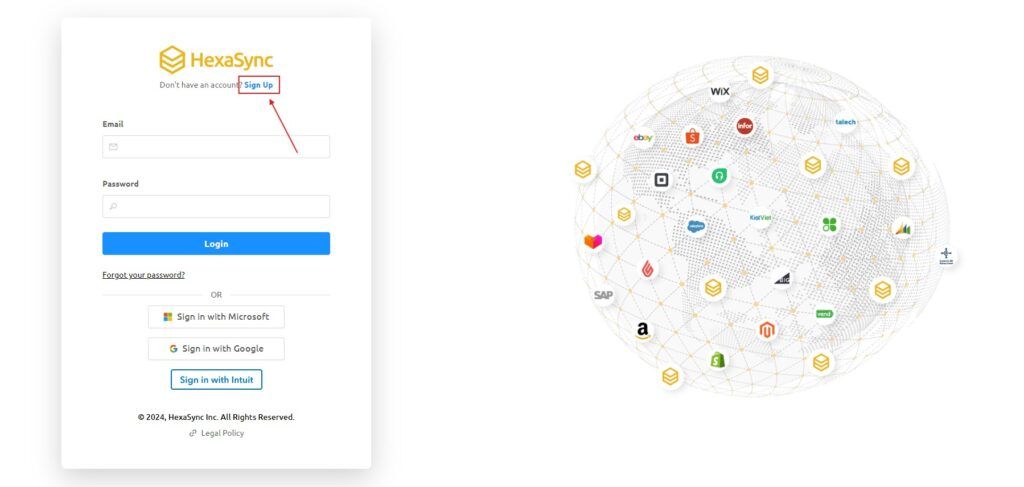
Note, use your organization’s email to register
Next, you need to fill in the information in the registration form and click the submit button to register an account
when the registration is successful, HexaSync will send an email containing the password to your email, please check your email and change the password immediately.
Step 2: Setup Ecwid stand-alone profile
Method 1:
- Send an email to HexaSync’s sales team or provide information so that our team can proactively contact you and listen to your needs. As a result, we will create your profile.
Method 2:
- Install the app from QuickBook Online marketplace or access to this link https://www.ecwid.com/apps/featured/hexasync
Click Get App and follow the instructions
Click Install to install the app
The system will redirect the page to the HexaSync interface.
Step 3: Check Missing Data
- Go to Ecwid Profile by clicking on the profile name.
- Select the report named “Ecwid: Duplicate SKU”
- All products’ SKUs and prices will be listed here with details such as product name, ID, etc.

After you update the product SKU, the reports in the HexaSync report will be updated in real-time so your business will easily manage data without wasting too much time and resources
Using HexaSync simplifies information management, reduces manual errors, and frees up resources. HexaSync is a valuable third-party application that can effectively assist businesses in solving the challenge of managing product images.