How To Edit A Customer’s Phone Number And Email In QuickBooks Online
The right customer information, especially phone number and email, is key to running a successful business. These details help you stay connected with your customers, offer personalized experiences, and provide excellent support. You can face communication problems and even legal issues without accurate contact information.
Are there any problems if the customers don’t have emails or phone numbers on QuickBooks Online?
1. Communication Barriers
- Customer Support: Providing timely support becomes challenging without contact information, leading to customer frustration.
- Updates and Notifications: Important updates about services or promotions cannot be communicated effectively.
2. Marketing Limitations
- Email Marketing: Missing email addresses means losing out on engaging customers and driving sales through email campaigns.
- SMS Campaigns: Without phone numbers, businesses cannot reach customers through personalized text messages.
3. CRM Challenges
- Incomplete Profiles: CRM systems rely on complete profiles to deliver personalized experiences. Missing contact data reduces their effectiveness.
- Data Analysis: Analyzing customer behavior becomes difficult, hindering informed business decisions.
4. Legal and Compliance Issues
- Regulatory Compliance: Some industries require accurate customer records, including contact information, to avoid legal complications.
- Data Protection: Without contact information, businesses might struggle to comply with data protection laws.
5. Customer Trust and Loyalty
- Trust Erosion: Customers may see the business as unprofessional if they cannot be contacted easily, damaging the brand’s reputation.
- Loyalty Programs: Many programs rely on contact information to track activity and reward loyalty effectively.
Benefits
On the flip side, keeping this information up-to-date brings many benefits, like better customer engagement and business growth. Knowing the importance of maintaining accurate contact details can help you build stronger, lasting relationships with your customers.
- Improved Communication:
- Timely Support: Updated contact information allows prompt customer support, quickly and efficiently addressing issues.
- Important Updates: Customers receive critical updates about services, policies, and promotions, ensuring they are always informed.
- Enhanced Marketing:
- Targeted Campaigns: Accurate email and phone numbers enable personalized marketing campaigns, increasing engagement and conversion rates.
- Multi-Channel Reach: Businesses can reach customers through multiple channels, including email, SMS, and phone calls, maximizing marketing efforts.
- Better Customer Relationship Management (CRM):
- Personalized Experiences: Up-to-date contact details help create complete customer profiles, allowing for tailored interactions and personalized experiences.
- Accurate Data Analysis: Reliable data enhances the ability to analyze customer behavior and preferences, leading to better decision-making.
- Compliance and Legal Assurance:
- Regulatory Compliance: Maintaining accurate records ensures compliance with industry regulations and data protection laws, avoiding legal issues.
- Data Security: Updated contact information helps in securely communicating privacy-related updates and consent requests.
- Increased Trust and Loyalty:
- Professionalism: Regular updates to contact information reflect a business’s commitment to professionalism and customer care.
- Effective Loyalty Programs: Accurate contact details enable efficient tracking and rewarding of customer loyalty, enhancing customer retention.
How to edit a customer’s Phone Number And Email in QuickBooks Online
HexaSync reports simplify the process of identifying and rectifying errors in customer and product information. Here’s a tutorial on addressing the issue of missing customer information in the QuickBooks Online system.
Step 1: Access to your QuickBooks Online Account
- Access the Quickbooks Intuit URL: https://qbo.intuit.com/app/homepage
Please log in with your organization’s account to access the dashboard interface of QuickBooks Intuit.
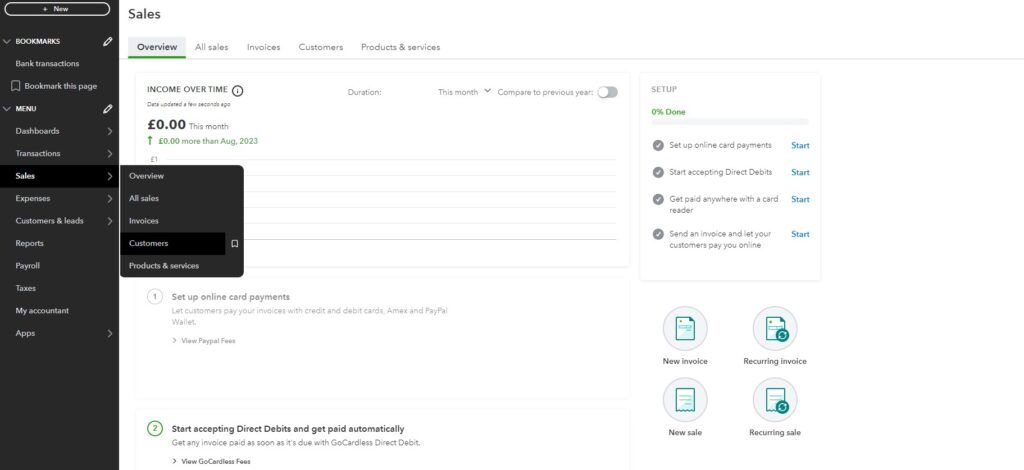
Step 2: Go to the Customer section
- Select ‘Sales’ then click on ‘Customers’
You will see a list of all your customers here
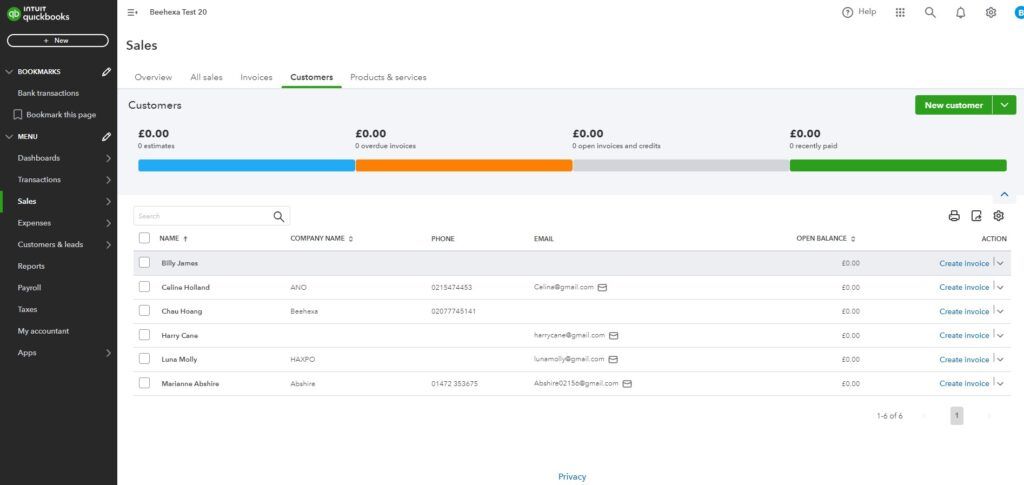
Step 3: Add customer information
Add Customer’s phone number
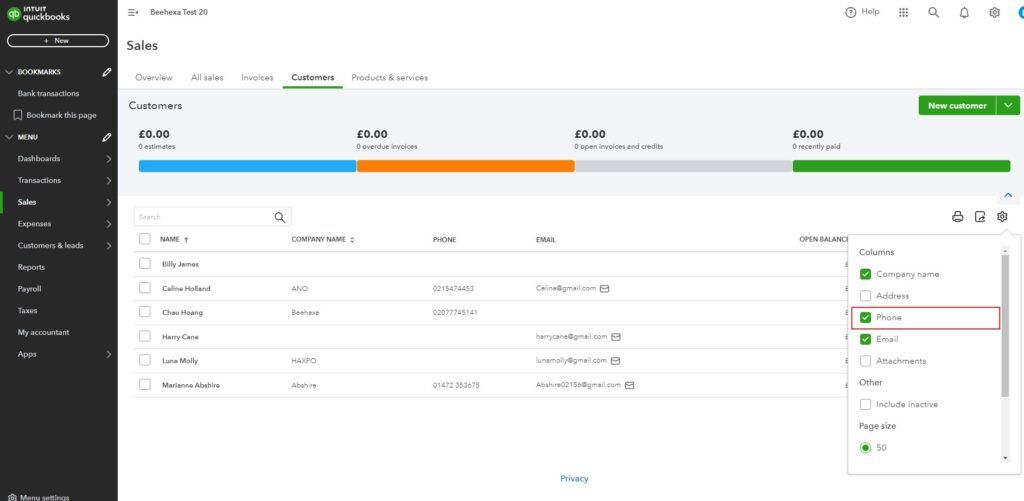
- In order to incorporate customer phone number information, it is essential to first show dedicated columns for customer phone numbers by clicking on the “Settings” button
- Then, select the ‘Phone’ column to display the customer’s phone number information
In this scenario, there are two customers for whom we are missing phone number information.
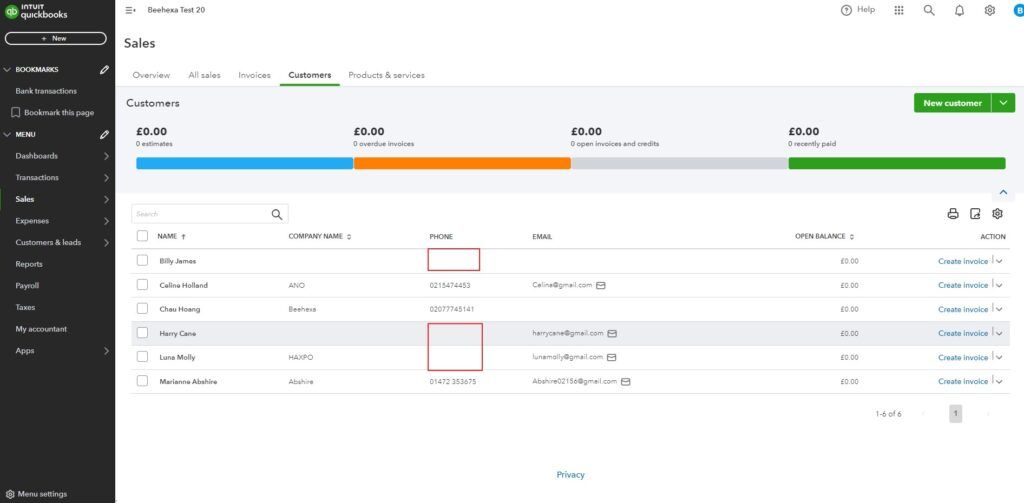
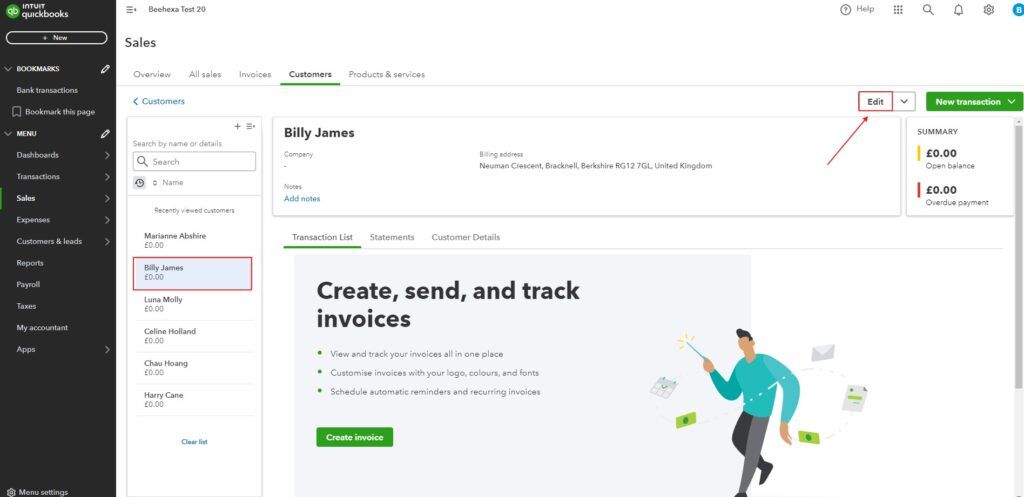
- To add information for a customer who is missing their phone, please select the customer and then click on the ‘Edit’ button located in the right corner of the screen.
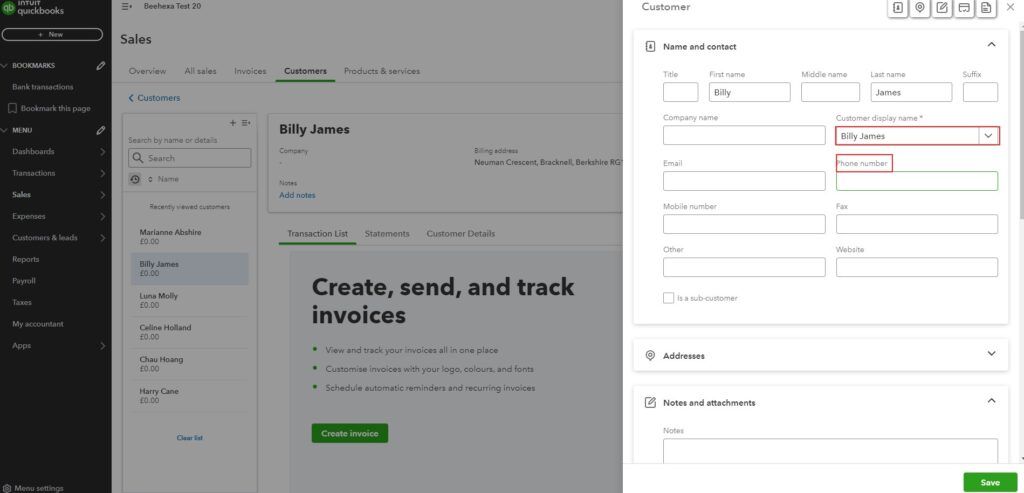
- A pop-up form will appear on the right side of the screen, displaying all information related to the customer.
To complete the process, simply enter the customer’s phone number into the ‘Phone number’ text box and then click the ‘Save’ button.
The customer’s phone number information has been updated as a result.
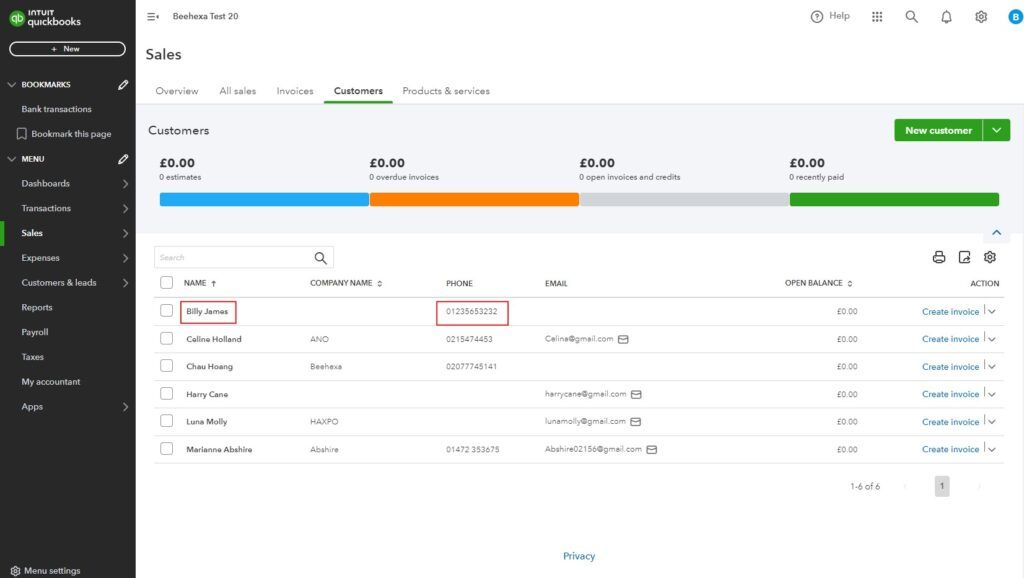
We have successfully added customer phone number information in QuickBooks Online.
Add Customer’s Email
- Similar to adding customer phone number information,
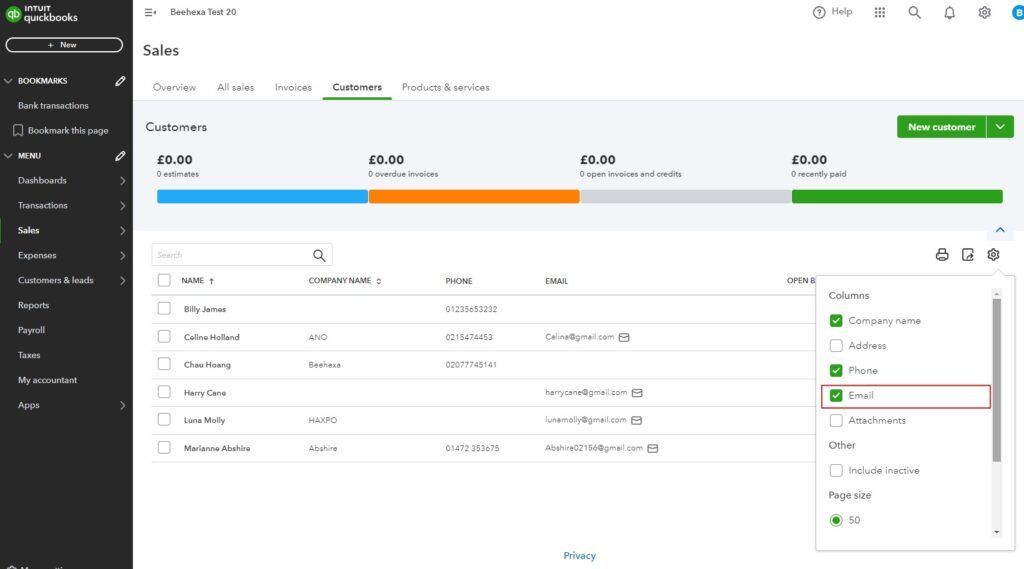
In order to incorporate customer email, it is essential to first show dedicated columns for customer emails by clicking on the Settings button
- Then select the ‘Email’ column to display the customer’s phone number information
In this scenario, there are one customer for whom we are missing email information.
-
To add information, please select the customer and then click on the ‘Edit’ button located in the right corner of the screen.
-
A pop-up form will appear on the right side of the screen, displaying all information related to the customer.
To complete the process, simply enter the customer’s phone number into the ‘Email’ text box and then click the ‘Save’ button.
The customer’s Email has been updated as a result.
We have successfully added customer Email information in QuickBooks Online.
- Then select the Email column to display the customer’s phone number information
How to quickly address customers that have problems
QuickBooks
You need to access your list of customers and review them one by one for any missing information.
Locating and fixing these omissions requires a significant time investment, especially when managing thousands of customers.
Dealing with products lacking images on QuickBooks Online is time-consuming. Users must manually scan and select items without images, which can lead to omissions. Locating and rectifying these omissions demands a substantial time investment, particularly when dealing with a large inventory encompassing potentially thousands of products.
HexaSync
Managing thousands of customers and identifying those lacking important information such as emails phone numbers or even both can be challenging.
We have the solution you are looking for! As one of the best tools, HexaSync can ensure accurate information, identify and correct mistakes easily, as well as integrate data between different platforms.
Here are the steps to address customers missing Emails and phone numbers in Quickbooks Online:
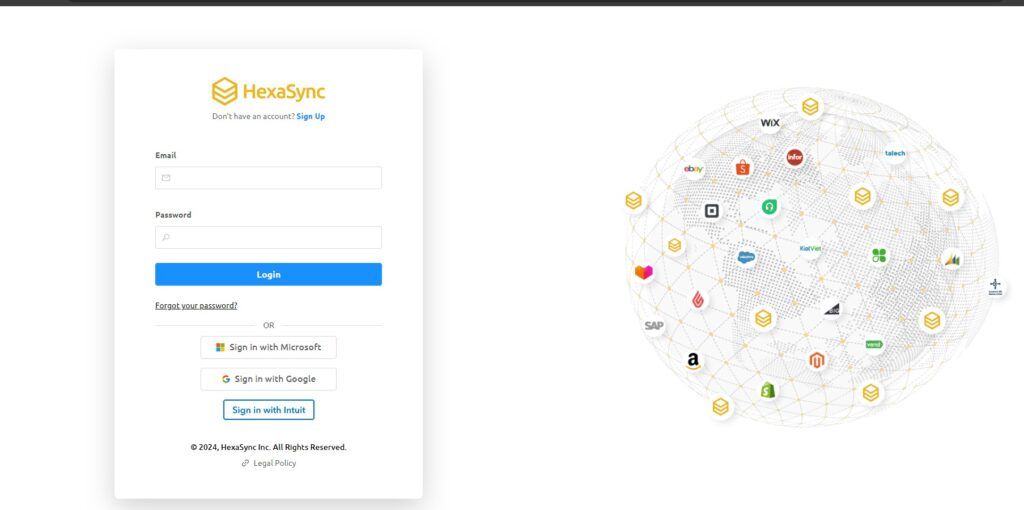
Step 1: Access HexaSync
- Login via Email or your QuickBooks Intuit account.
Step 2: Check Missing Data
-
Go to QuickBooks Profile by clicking on the profile name.
-
Select the reports named “[QuickBooks] Customers: Missing Email” and “[QuickBooks] Customers: Missing phone”
-
All customers missing that information will be listed here with details such as name, and ID.
After you update customer information, reports in HexaSync reports will be updated in real time, so your business will easily manage data without wasting too much time and resources
Conclusion
Accurate customer contact information is essential for business success. Without it, you face communication, marketing, CRM, legal, and trust issues. By following the outlined steps, you can ensure accurate customer records, leading to better support, personalized marketing, and compliance. Tools like HexaSync make managing and updating customer information even more efficient, strengthening your customer relationships.