How to Add a Shipping Calculator to Shopify Shopping Cart?
Table of Contents
I will show you how to add a shipping calculator to your Shopify Shopping cart. This is a detailed guide with images so that non-tech store owners can execute on their own.
Still, HTML, CSS, JavaScript, and Liquid are all necessary. If you’re having trouble following the steps in the tutorial or want to set advanced shipping rules in Shopify, consider hiring a Shopify Expert.
What is Shipping rate calculator?
The shipping rates calculator is an advanced solution that lets customers estimate their shipping costs before they proceed to the checkout page.

Feature of Shipping rate calculator
On the cart page of your store, the shipping rates calculator displays your shipping rates. If a client is logged in, the calculator estimates shipping charges using the customer’s default shipping address. The shipping rates calculator accepts carrier-calculated, custom rates, or a combination of both rates.
- The shipping rate calculator only appears at on the cart page at www.your-shop-url.com/cart
- You can update your cart settings in the theme editor if you aren’t presently using a cart page.

- The rates are approximations in some cases because only the nation, province/state, and postal/zip code are provided for calculation rather than the whole address. At the time of checkout, you will be informed the actual pricing.
- It is possible to translate the displayed text.
- The currency description, such as CAD or USD, is included in the rates, which are formatted in your shop’s currency.
- If you know the basics of HTML, you can easily alter the calculator’s HTML.
- The calculator is built with an Underscore.js template and a JSON API. To get rates from Shopify, it uses Ajax.
- On the cart page, there is no similar API for calculating appropriate taxes. Taxes are calculated at the time of purchase.
- Currently, shipping calculators do not work in multiple currencies.
How to add a shipping rate calculator to your Shopify cart?
- In Shopify admin, go to Online Store > Themes.
- Choose your theme, and then click Actions > Edit code.

-
In the Assets directory, click vendor.js. If your theme doesn’t have a vendor.js file, then click theme.js instead.
-
Paste the code below to:
- The bottom if you are using vendor.js
- The top if you are using theme.js
"object" == typeof Countries &&
  (Countries.updateProvinceLabel = function (e, t) {
    if ("string" == typeof e && Countries[e] && Countries[e].provinces) {
      if (
        "object" != typeof t &&
        ((t = document.getElementById("address_province_label")), null === t)
      )
        return;
      t.innerHTML = Countries[e].label;
      var r = jQuery(t).parent();
      r.find("select");
      r.find(".custom-style-select-box-inner").html(Countries[e].provinces[0]);
    }
  }),
  "undefined" == typeof Shopify.Cart && (Shopify.Cart = {}),
  (Shopify.Cart.ShippingCalculator = (function () {
    var _config = {
        submitButton: "Calculate shipping",
        submitButtonDisabled: "Calculating...",
        templateId: "shipping-calculator-response-template",
        wrapperId: "wrapper-response",
        customerIsLoggedIn: !1,
        moneyFormat: "${{amount}}",
      },
      _render = function (e) {
        var t = jQuery("#" + _config.templateId),
          r = jQuery("#" + _config.wrapperId);
        if (t.length && r.length) {
          var templateSettings = {
            evaluate: /<%([sS]+?)%>/g,
            interpolate: /<%=([sS]+?)%>/g,
            escape: /<%-([sS]+?)%>/g,
          };
          var n = Handlebars.compile(jQuery.trim(t.text())),
            a = n(e);
          if (
            (jQuery(a).appendTo(r),
            "undefined" != typeof Currency &&
              "function" == typeof Currency.convertAll)
          ) {
            var i = "";
            jQuery("[name=currencies]").size()
              ? (i = jQuery("[name=currencies]").val())
              : jQuery("#currencies span.selected").size() &&
                (i = jQuery("#currencies span.selected").attr("data-currency")),
              "" !== i &&
                Currency.convertAll(
                  shopCurrency,
                  i,
                  "#wrapper-response span.money, #estimated-shipping span.money"
                );
          }
        }
      },
      _enableButtons = function () {
        jQuery(".get-rates")
          .removeAttr("disabled")
          .removeClass("disabled")
          .val(_config.submitButton);
      },
      _disableButtons = function () {
        jQuery(".get-rates")
          .val(_config.submitButtonDisabled)
          .attr("disabled", "disabled")
          .addClass("disabled");
      },
      _getCartShippingRatesForDestination = function (e) {
        var t = {
          type: "POST",
          url: "/cart/prepare_shipping_rates",
          data: jQuery.param({ shipping_address: e }),
          success: _pollForCartShippingRatesForDestination(e),
          error: _onError,
        };
        jQuery.ajax(t);
      },
      _pollForCartShippingRatesForDestination = function (e) {
        var t = function () {
          jQuery.ajax("/cart/async_shipping_rates", {
            dataType: "json",
            success: function (r, n, a) {
              200 === a.status
                ? _onCartShippingRatesUpdate(r.shipping_rates, e)
                : setTimeout(t, 500);
            },
            error: _onError,
          });
        };
        return t;
      },
      _fullMessagesFromErrors = function (e) {
        var t = [];
        return (
          jQuery.each(e, function (e, r) {
            jQuery.each(r, function (r, n) {
              t.push(e + " " + n);
            });
          }),
          t
        );
      },
      _onError = function (XMLHttpRequest, textStatus) {
        jQuery("#estimated-shipping").hide(),
          jQuery("#estimated-shipping em").empty(),
          _enableButtons();
        var feedback = "",
          data = eval("(" + XMLHttpRequest.responseText + ")");
        (feedback = data.message
          ? data.message + "(" + data.status + "): " + data.description
          : "Error : " + _fullMessagesFromErrors(data).join("; ") + "."),
          "Error : country is not supported." === feedback &&
            (feedback = "We do not ship to this destination."),
          _render({ rates: [], errorFeedback: feedback, success: !1 }),
          jQuery("#" + _config.wrapperId).show();
      },
      _onCartShippingRatesUpdate = function (e, t) {
        _enableButtons();
        var r = "";
        if (
          (t.zip && (r += t.zip + ", "),
          t.province && (r += t.province + ", "),
          (r += t.country),
          e.length)
        ) {
          "0.00" == e[0].price
            ? jQuery("#estimated-shipping em").html("FREE")
            : jQuery("#estimated-shipping em").html(_formatRate(e[0].price));
          for (var n = 0; n < e.length; n++)
            e[n].price = _formatRate(e[n].price);
        }
        _render({ rates: e, address: r, success: !0 }),
          jQuery("#" + _config.wrapperId + ", #estimated-shipping").fadeIn();
      },
      _formatRate = function (e) {
        function t(e, t) {
          return "undefined" == typeof e ? t : e;
        }
        function r(e, r, n, a) {
          if (
            ((r = t(r, 2)),
            (n = t(n, ",")),
            (a = t(a, ".")),
            isNaN(e) || null == e)
          )
            return 0;
          e = (e / 100).toFixed(r);
          var i = e.split("."),
            o = i[0].replace(/(d)(?=(ddd)+(?!d))/g, "$1" + n),
            s = i[1] ? a + i[1] : "";
          return o + s;
        }
        if ("function" == typeof Shopify.formatMoney)
          return Shopify.formatMoney(e, _config.moneyFormat);
        "string" == typeof e && (e = e.replace(".", ""));
        var n = "",
          a = /{{s*(w+)s*}}/,
          i = _config.moneyFormat;
        switch (i.match(a)[1]) {
          case "amount":
            n = r(e, 2);
            break;
          case "amount_no_decimals":
            n = r(e, 0);
            break;
          case "amount_with_comma_separator":
            n = r(e, 2, ".", ",");
            break;
          case "amount_no_decimals_with_comma_separator":
            n = r(e, 0, ".", ",");
        }
        return i.replace(a, n);
      };
    return (
      (_init = function () {
        new Shopify.CountryProvinceSelector(
          "address_country",
          "address_province",
          { hideElement: "address_province_container" }
        );
        var e = jQuery("#address_country"),
          t = jQuery("#address_province_label").get(0);
        "undefined" != typeof Countries &&
          (Countries.updateProvinceLabel(e.val(), t),
          e.change(function () {
            Countries.updateProvinceLabel(e.val(), t);
          })),
          jQuery(".get-rates").click(function () {
            _disableButtons(),
              jQuery("#" + _config.wrapperId)
                .empty()
                .hide();
            var e = {};
            (e.zip = jQuery("#address_zip").val() || ""),
              (e.country = jQuery("#address_country").val() || ""),
              (e.province = jQuery("#address_province").val() || ""),
              _getCartShippingRatesForDestination(e);
          }),
          _config.customerIsLoggedIn &&
            jQuery(".get-rates:eq(0)").trigger("click");
      }),
      {
        show: function (e) {
          (e = e || {}),
            jQuery.extend(_config, e),
            jQuery(function () {
              _init();
            });
        },
        getConfig: function () {
          return _config;
        },
        formatRate: function (e) {
          return _formatRate(e);
        },
      }
    );
  })());
- Click Save
- Go to the bottom of theme.js file paste the following code:
Shopify.Cart.ShippingCalculator.show( {
  submitButton: theme.strings.shippingCalcSubmitButton,
  submitButtonDisabled: theme.strings.shippingCalcSubmitButtonDisabled,
  customerIsLoggedIn: theme.strings.shippingCalcCustomerIsLoggedIn,
  moneyFormat: theme.strings.shippingCalcMoneyFormat
} );- Click Save
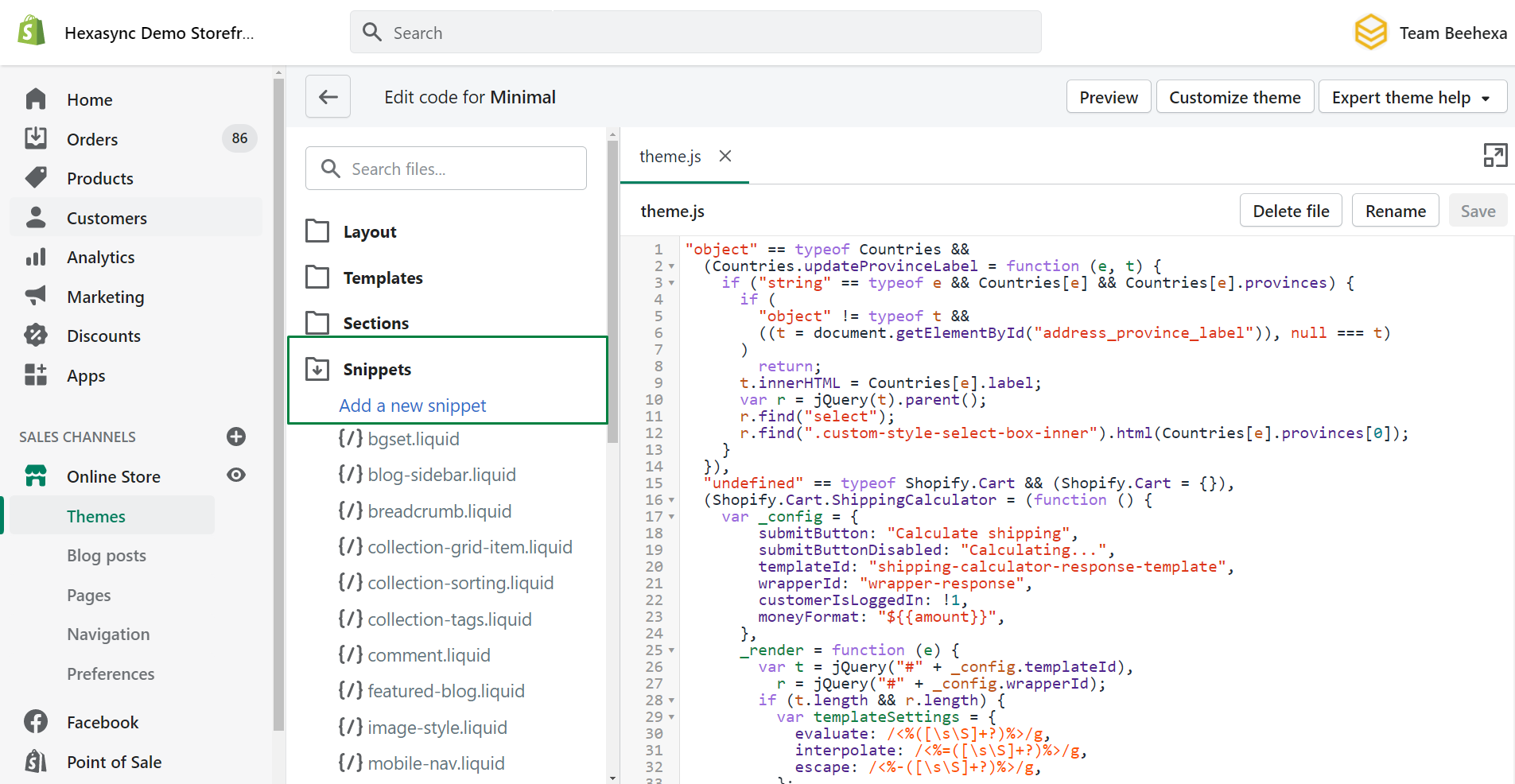
- In the Snippets section, click Add a new snippet
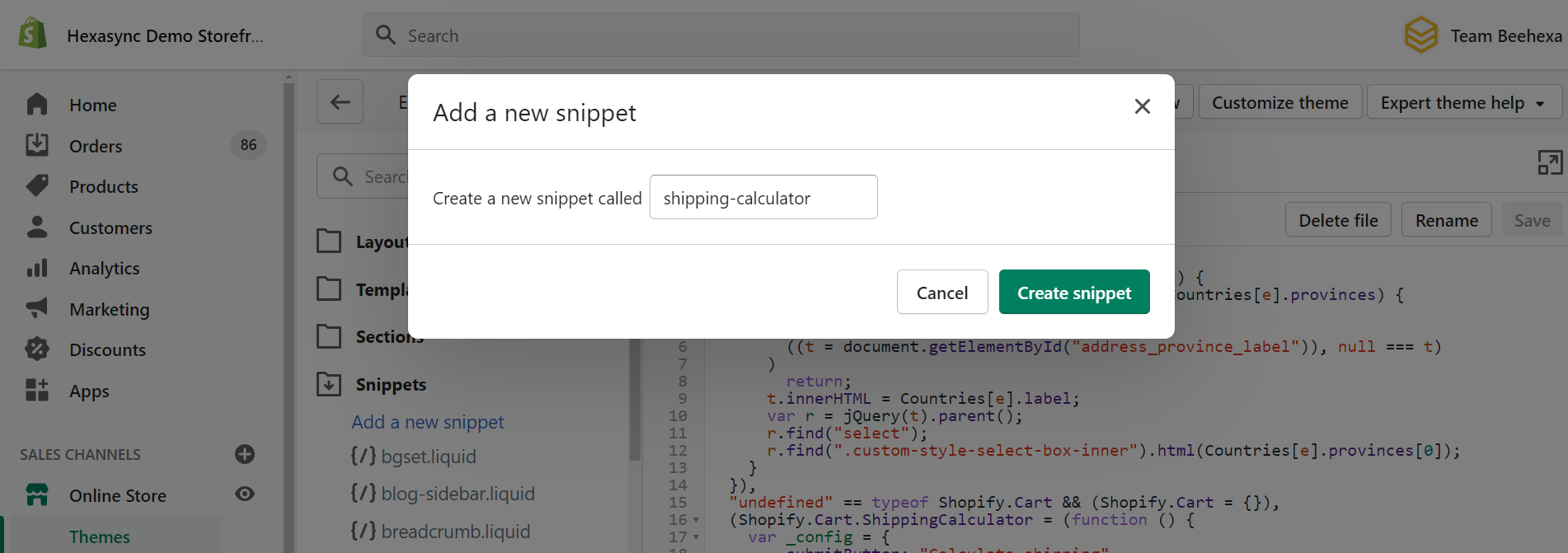
- Name your new snippet shipping-calculator, and click Create snippet:
- In the new shipping-calculator.liquid code editor, paste this code:
{% unless settings.shipping_calculator == 'Disabled' %}
<div id="shipping-calculator">
  <h3>{{ settings.shipping_calculator_heading | default: 'Get shipping estimates' }}</h3>
  <div>
    <p>
      <label for="address_country">Country</label>
      <select id="address_country" name="address[country]" data-default="{% if shop.customer_accounts_enabled and customer %}{{ customer.default_address.country }}{% elsif settings.shipping_calculator_default_country != '' %}{{ settings.shipping_calculator_default_country }}{% endif %}">{{ country_option_tags }}</select>
    </p>
    <p id="address_province_container" style="display:none;">
      <label for="address_province" id="address_province_label">Province</label>
      <select id="address_province" name="address[province]" data-default="{% if shop.customer_accounts_enabled and customer and customer.default_address.province != '' %}{{ customer.default_address.province }}{% endif %}"></select>
    </p>
    <p>
      <label for="address_zip">Zip/Postal Code</label>
      <input type="text" id="address_zip" name="address[zip]"{% if shop.customer_accounts_enabled and customer %} value="{{ customer.default_address.zip }}"{% endif %} />
    </p>
    <p>
      <input type="button" value="{{ settings.shipping_calculator_submit_button_label | default: 'Calculate shipping' }}" />
    </p>
  </div>
  <div id="wrapper-response"></div>
</div>
{% endunless %}
<script id="shipping-calculator-response-template" type="text/template">
  {% raw %}
  <p id="shipping-rates-feedback" {{#if success}} {{else}} {{/if}}>
  {{#if success}}
    {{#if rates}}
      {{#rates}}
        {{#if @first}}
            Rates start at {{price}}.
        {{/if}}
      {{/rates}}
    {{else}}
      We do not ship to this destination.
    {{/if}}
  {{else}}
    {{ errorFeedback }}
  {{/if}}
  </p>
  {% endraw %}
</script>
<!--[if lte IE 8]>
<style> #shipping-calculator { display: none; } </style>
<![endif]-->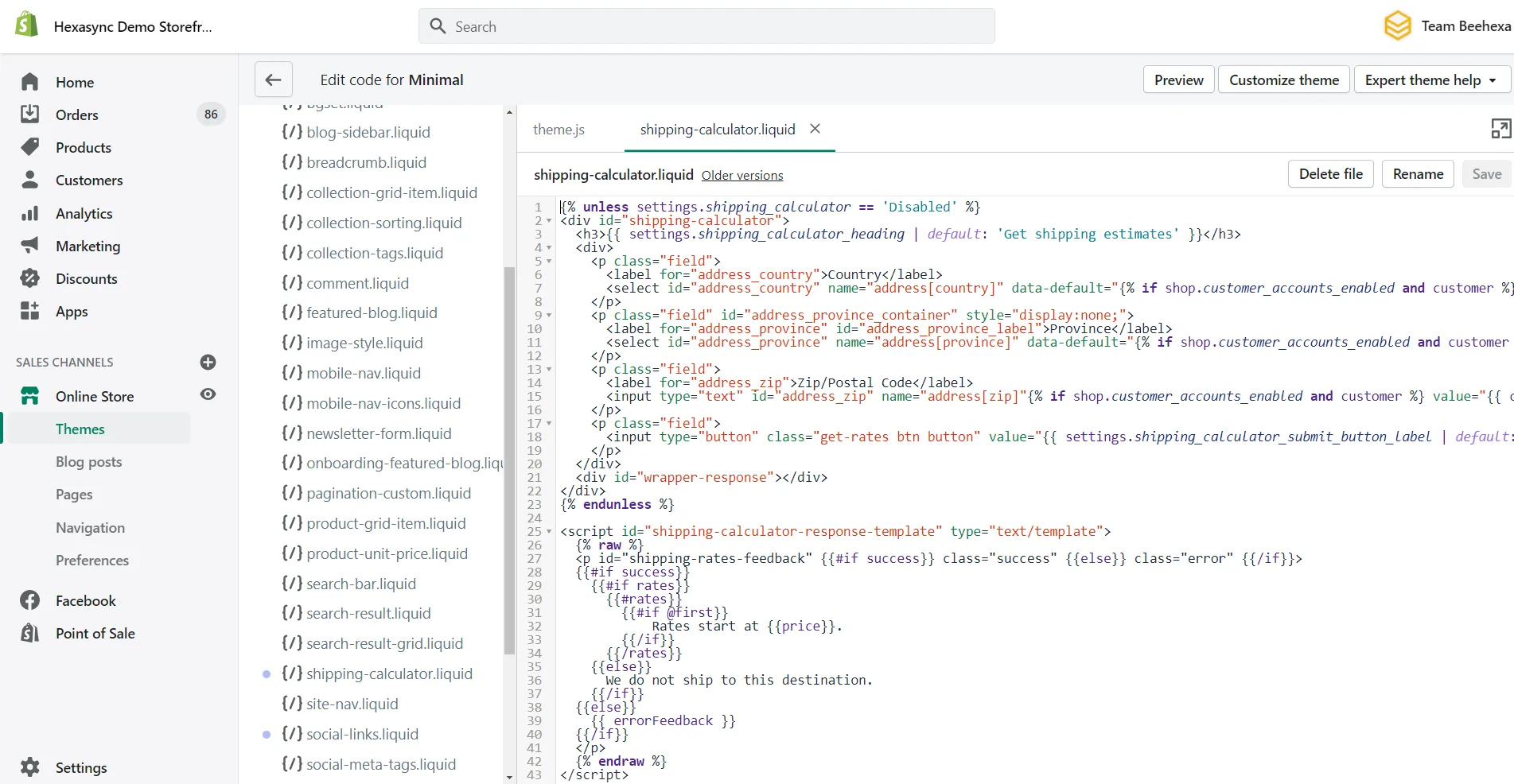
- Click Save
- In the Sections directory, click cart-template.liquid. If your theme doesn’t have a cart-template.liquid, then, in the Templates directory, click cart.liquid.
- Crtl + H, and search for form
- On a new line right above the closing tag, paste the following code:
{% render 'shipping-calculator' %}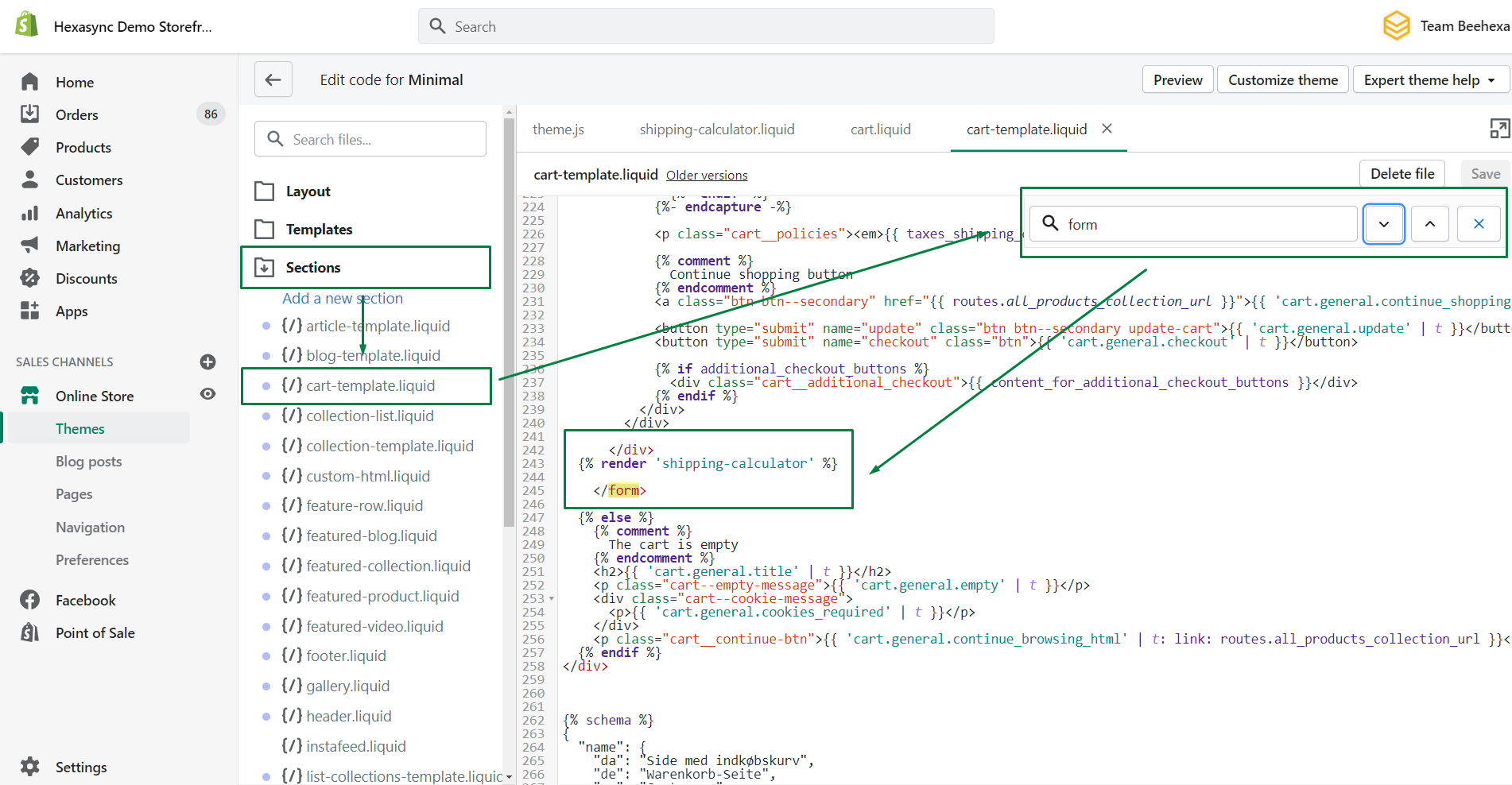
- Go to the bottom of the file, paste the following code:
<script>
  theme.strings = {
      shippingCalcSubmitButton: {{ settings.shipping_calculator_submit_button_label | default: 'Calculate shipping' | json }},
      shippingCalcSubmitButtonDisabled: {{ settings.shipping_calculator_submit_button_label_disabled | default: 'Calculating...' | json }},
      {% if customer %}shippingCalcCustomerIsLoggedIn: true,{% endif %}
      shippingCalcMoneyFormat: {{ shop.money_with_currency_format | json }}
  }
</script>
<script src="//cdnjs.cloudflare.com/ajax/libs/handlebars.js/4.0.10/handlebars.min.js"></script>
<script src="/services/javascripts/countries.js"></script>
<script src="{{ 'shopify_common.js' | shopify_asset_url }}" defer="defer"></script>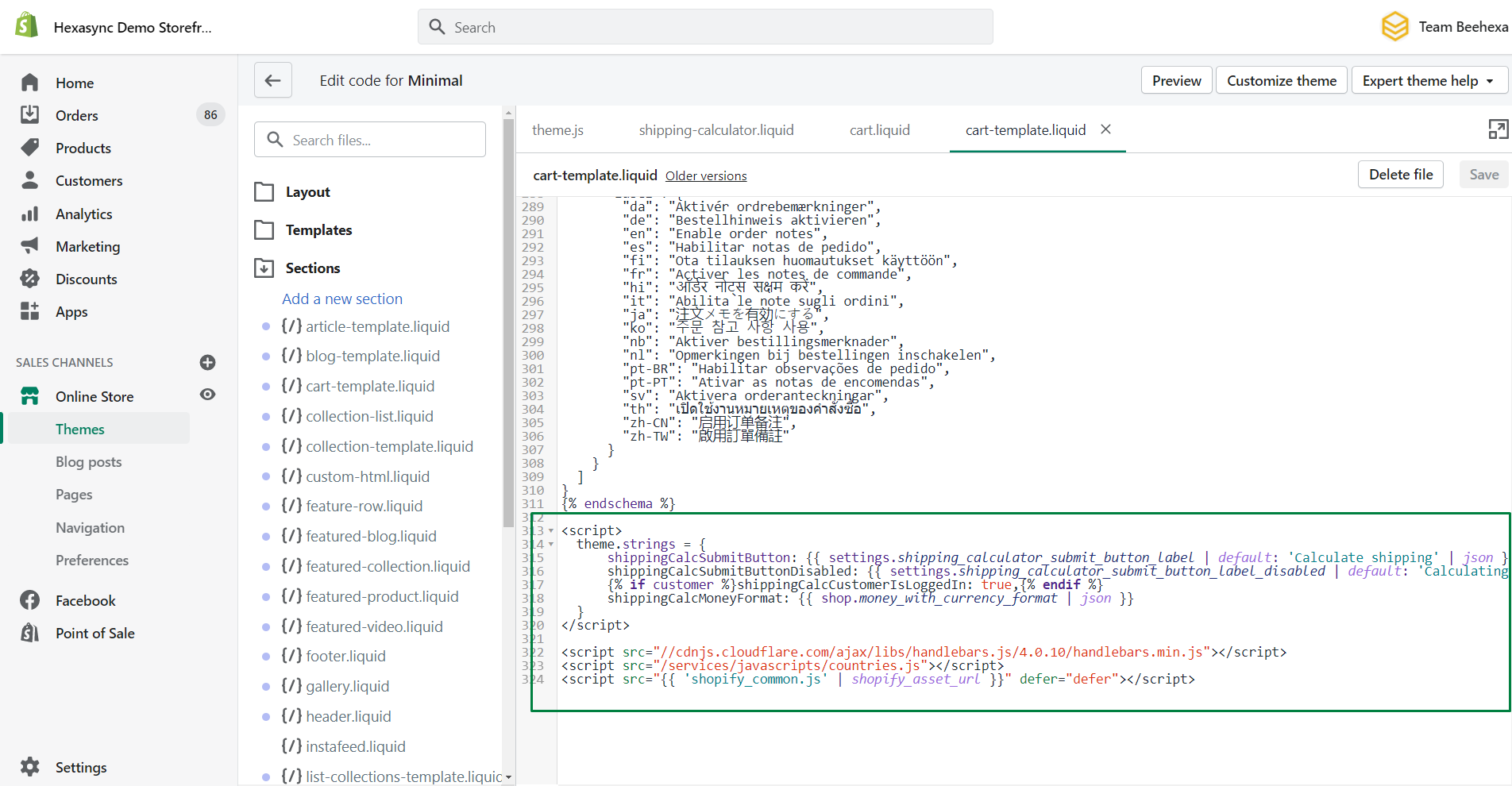
- Click Save
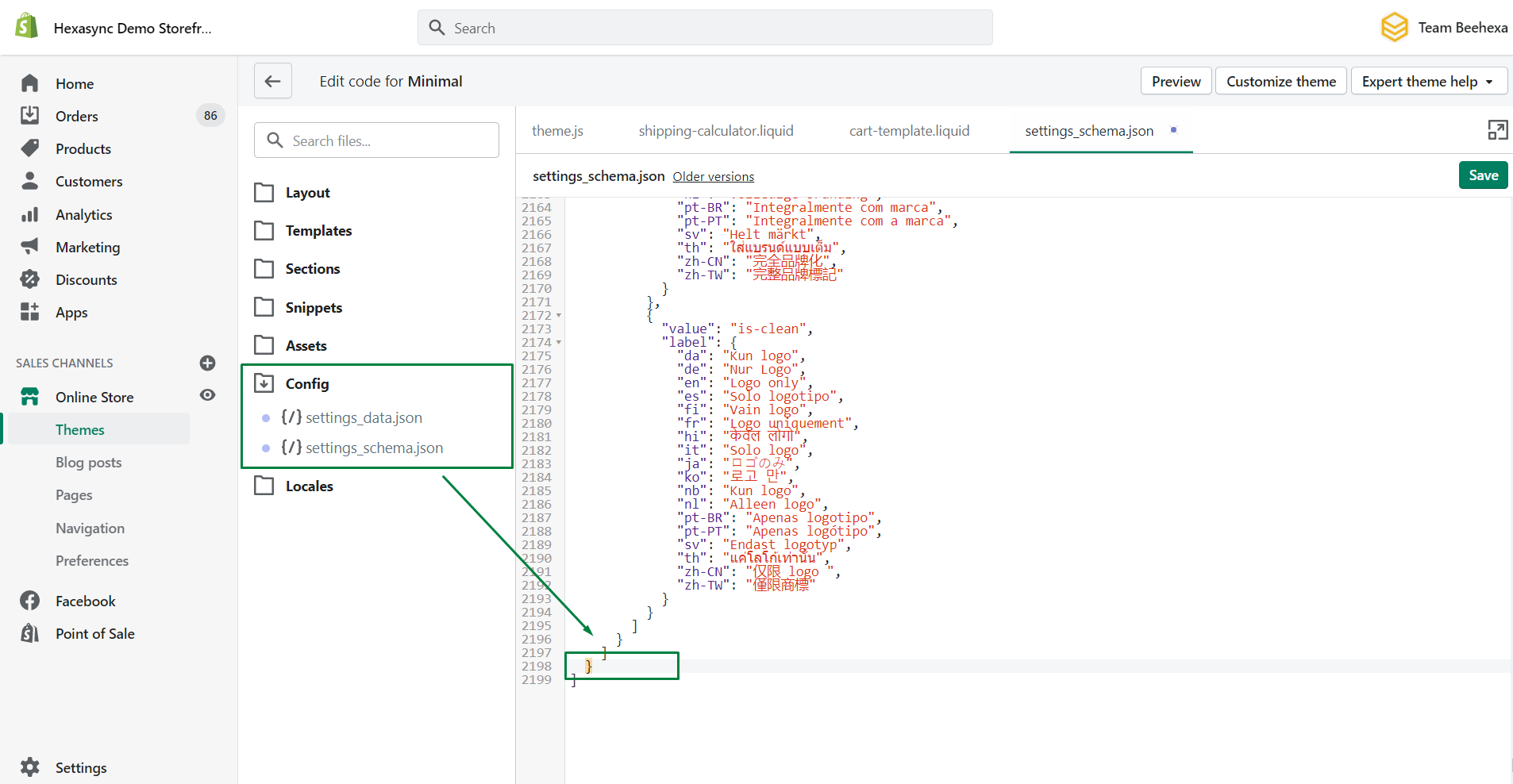
- Go to the Config directory, click settings_schema.json. The file will open in the code editor.
- Paste the following code before the last square bracket ] and after the last curly bracket } – make sure to include that first comma , since you’re modifying a JSON data structure:
,
  {
    "name": "Shipping Rates Calculator",
    "settings": [
      {
        "type": "select",
        "id": "shipping_calculator",
        "label": "Show the shipping calculator?",
        "options": [
          {
            "value": "Disabled",
            "label": "No"
          },
          {
            "value": "Enabled",
            "label": "Yes"
          }
        ],
        "default": "Enabled"
      },
      {
        "type": "text",
        "id": "shipping_calculator_heading",
        "label": "Heading text",
        "default": "Get shipping estimates"
      },
      {
        "type": "text",
        "id": "shipping_calculator_default_country",
        "label": "Default country selection",
        "default": "United States"
      },
      {
        "type": "paragraph",
        "content": "If your customer is logged-in, the country in his default shipping address will be selected. If you are not sure about the  spelling to use here, refer to the first checkout page."
      },
      {
        "type": "text",
        "id": "shipping_calculator_submit_button_label",
        "label": "Submit button label",
        "default": "Calculate shipping"
      },
      {
        "type": "text",
        "id": "shipping_calculator_submit_button_label_disabled",
        "label": "Submit button label when calculating",
        "default": "Calculating..."
      },
      {
        "type": "paragraph",
        "content": "Do not forget to include the snippet shipping-calculator in your cart.liquid template where you want the shipping  calculator to appear. You can get the snippet here: [shipping-calculator.liquid](https://github.com/carolineschnapp/shipping-calculator/blob/master/shipping-calculator.liquid) ."
      }
    ]
}- Click Save
How to configure your shipping rate calculator?
The shipping rate calculated now can be set up in the Theme editor.
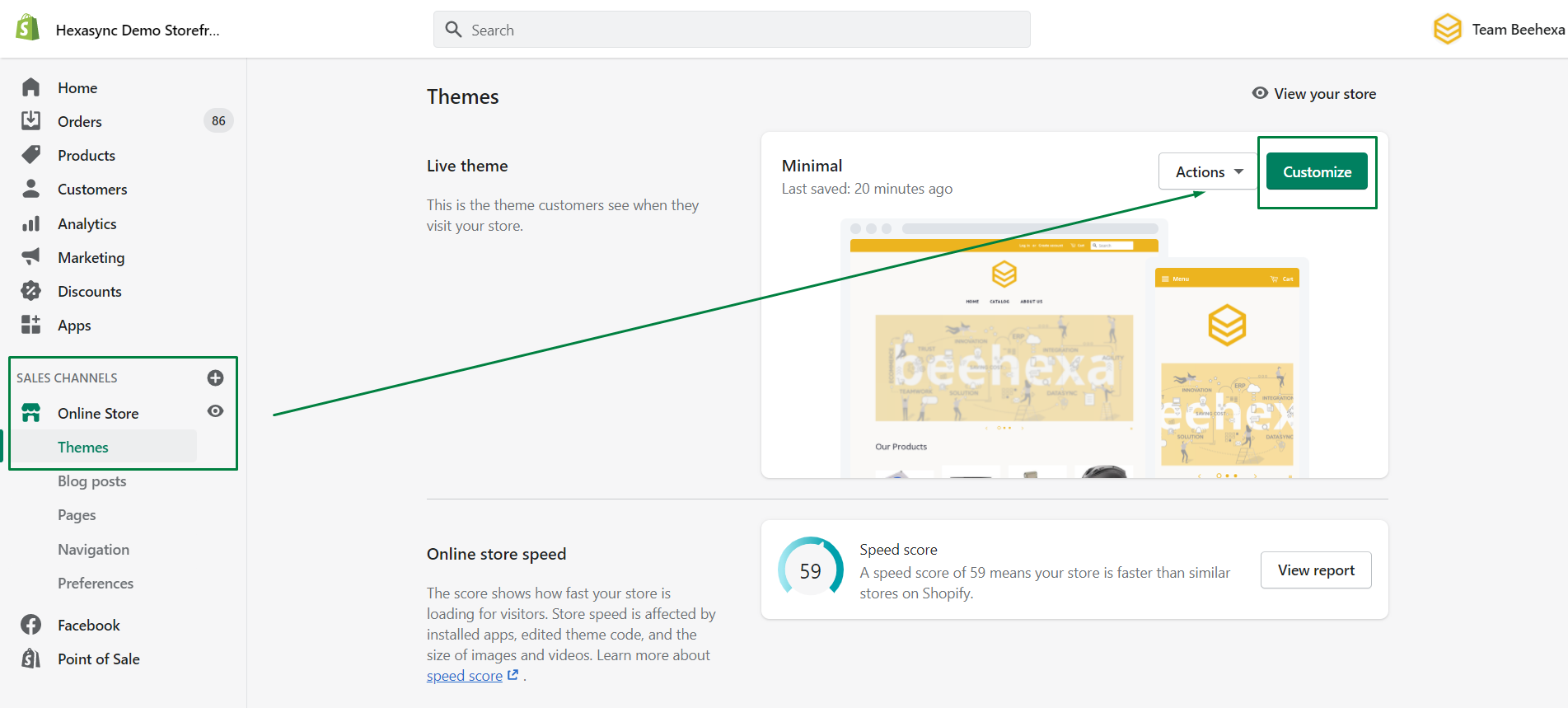
- Go to Themes > Customize
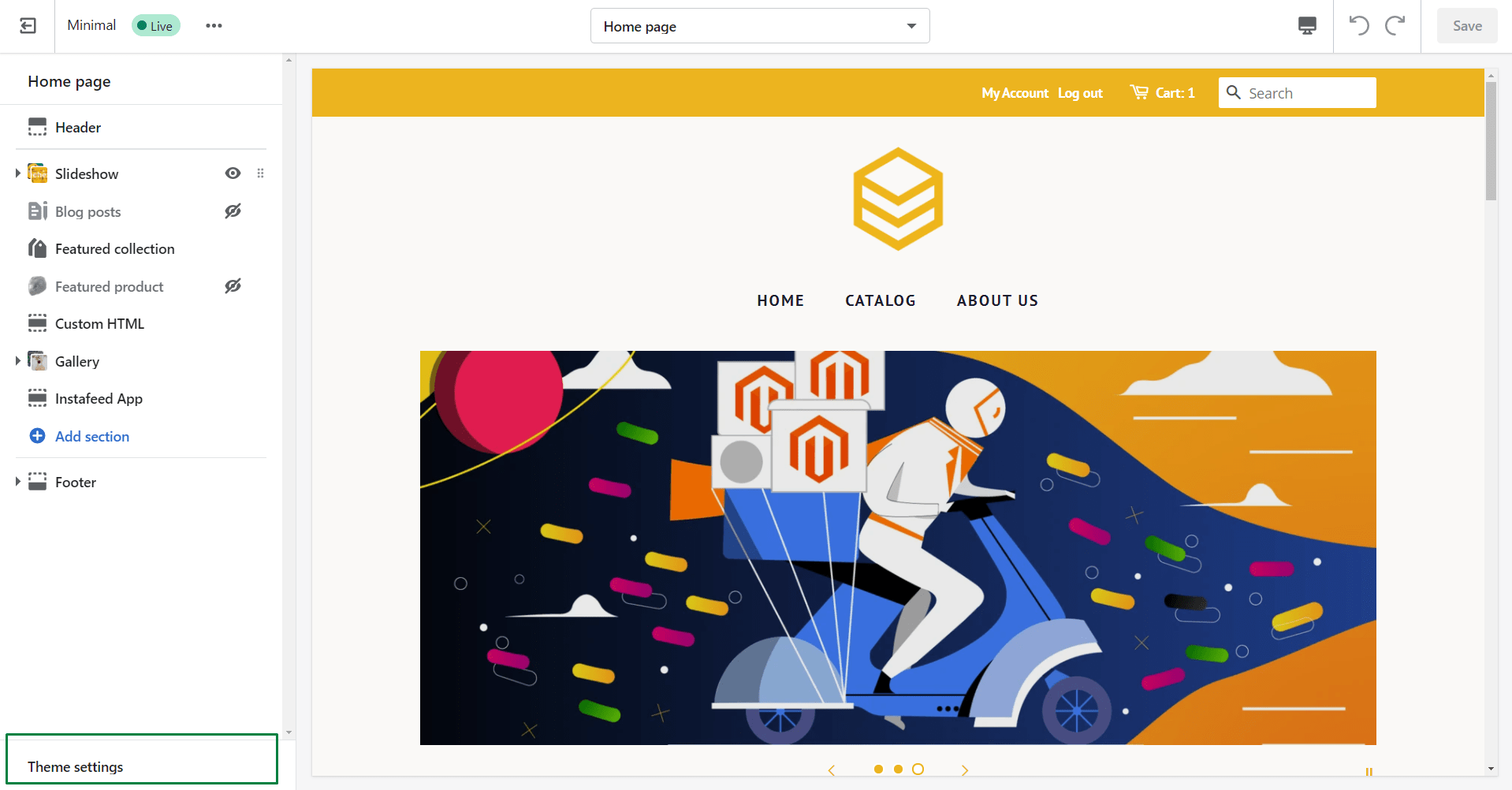
- Click Theme settings in the bottom left corner
-
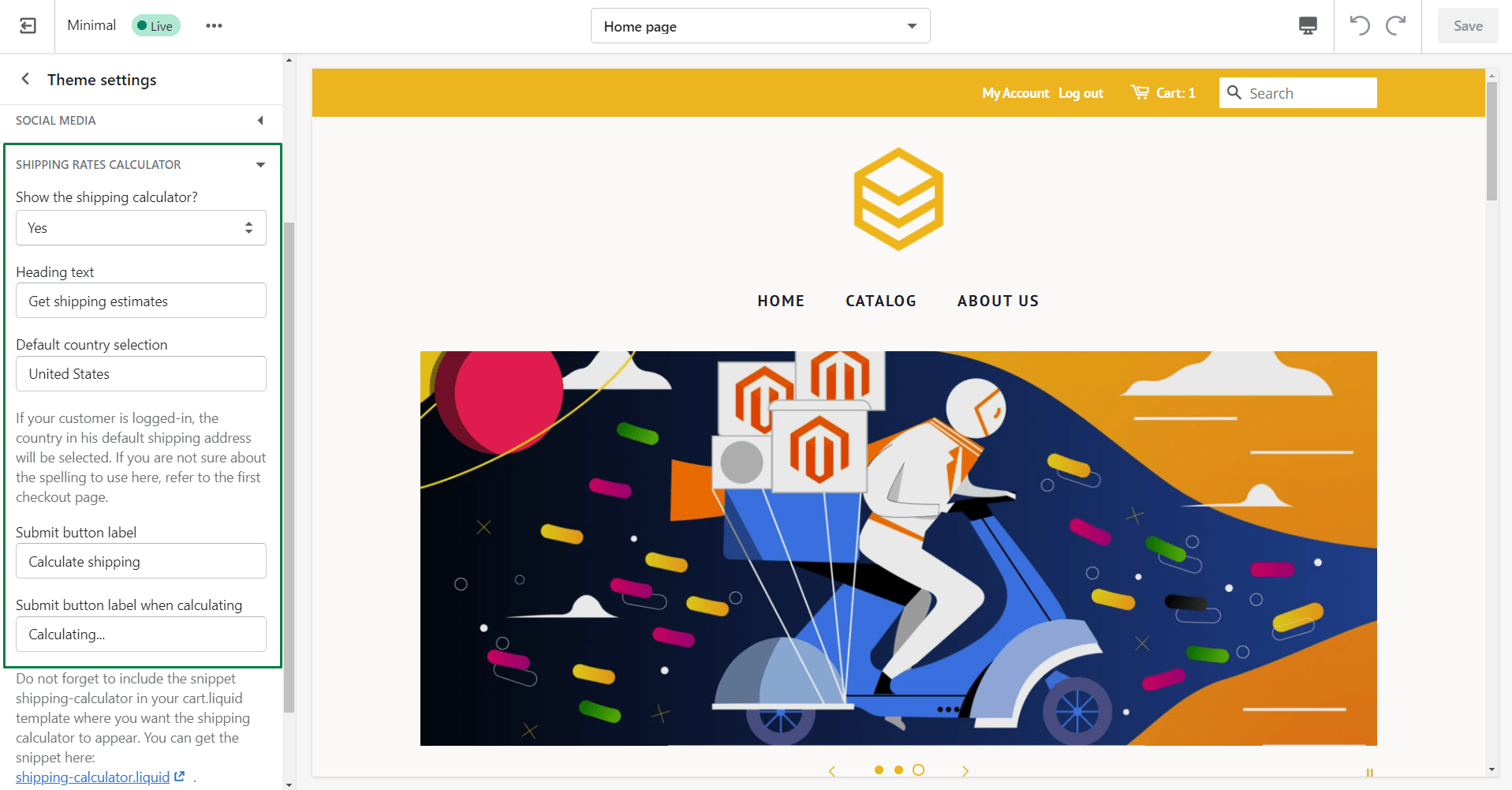
Click Shipping Rates Calculator to view and edit the calculator settings.
- Show the shipping calculator? – set this to Yes to display the shipping rates calculator on your cart page, or No to hide it
- Heading text – enter the text that will be displayed above your shipping rates calculator
- Default country selection – choose which country will be selected by default
- Submit button label – enter the text that will be shown on the submit button.
- Click Save
How to editing the HTML or CSS of the shipping calculator
I will show you how to customize the shipping calculator.
Adjust shipping calculator HTML
- In Shopify admin, go to Online Store > Themes.
- Find the theme you want to edit, and then click Actions > Edit code.
- In the Snippets directory, click shipping-calculator.liquid.
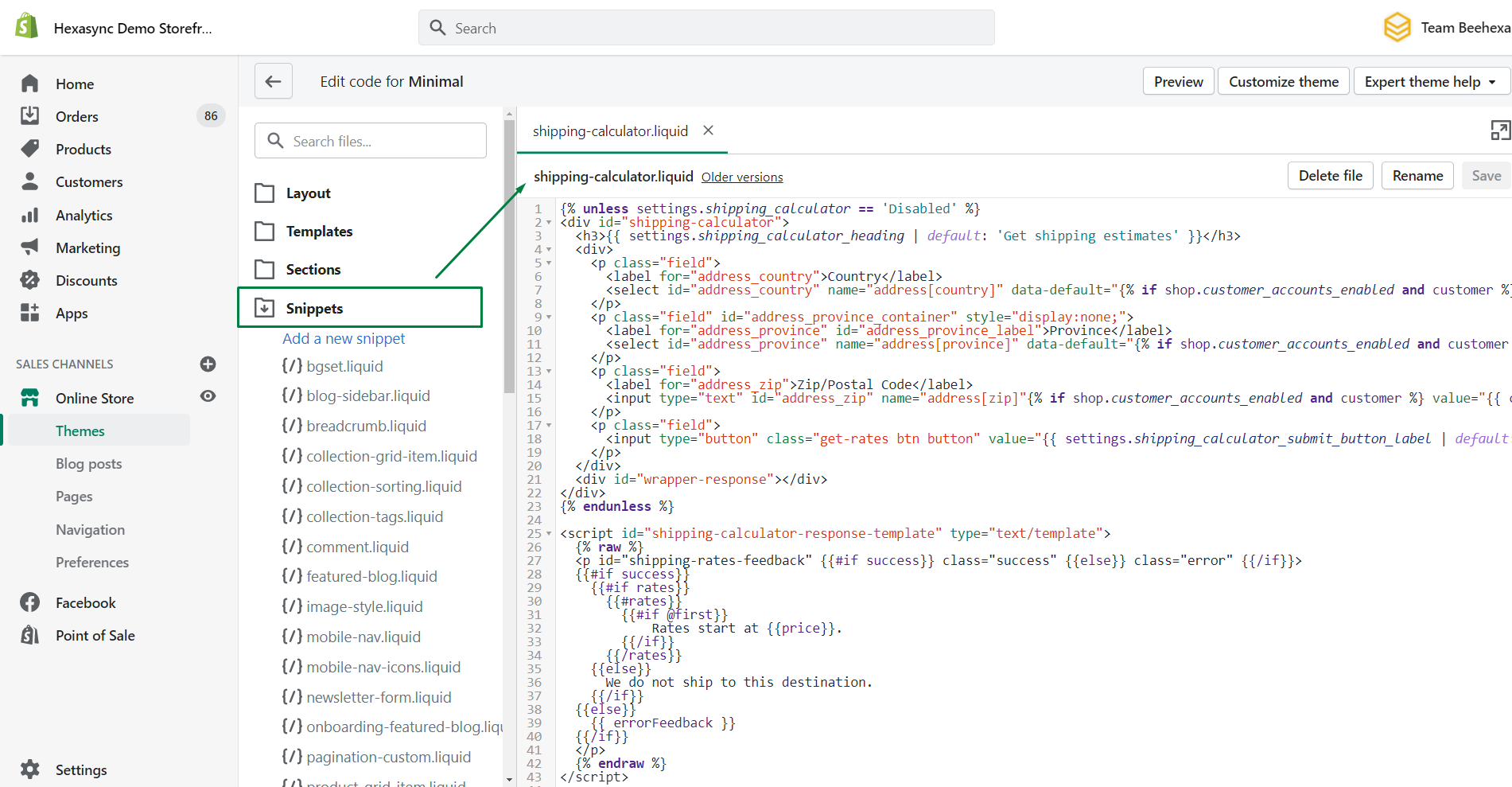
- Edit the code as needed. You can add new classes and move the existing HTML elements around in the file to suit your needs.
- Click Save
Adjust shipping calculator CSS
You can customize the design of your shipping rates calculator by adding CSS to your theme stylesheet.
- In Shopify admin, go to Online Store > Themes.
- Find the theme you want to edit, and then click Actions > Edit code.
- In the Assets directory, click theme.scss.liquid.
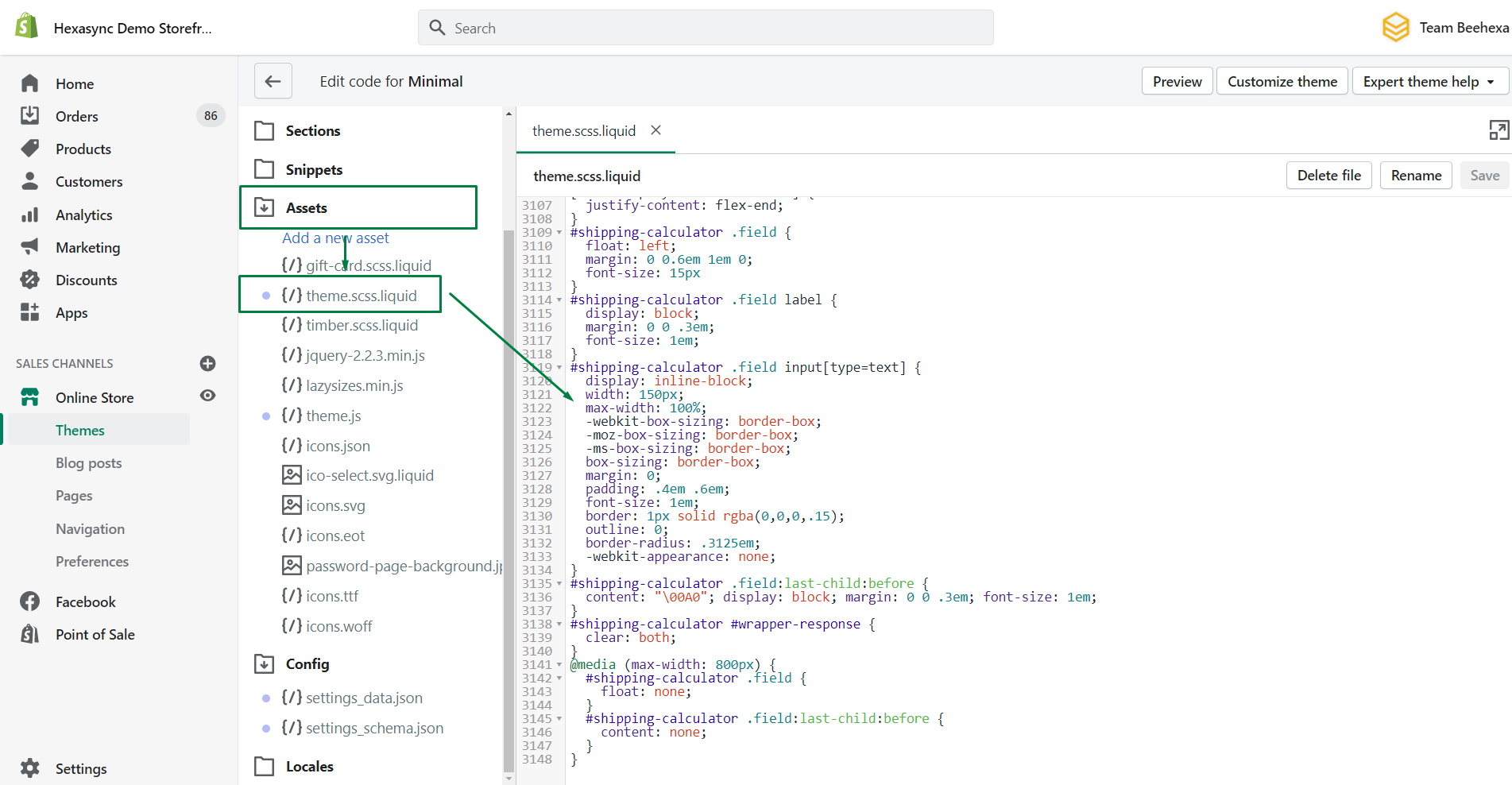
- At the very bottom of the file, add either the contents of the below CSS file, or your own custom CSS code.
#shipping-calculator .field {
  float: left;
  margin: 0 0.6em 1em 0;
  font-size: 15px
}
#shipping-calculator .field label {
  display: block;
  margin: 0 0 .3em;
  font-size: 1em;
}
#shipping-calculator .field input[type=text] {
  display: inline-block;
  width: 150px;
  max-width: 100%;
  -webkit-box-sizing: border-box;
  -moz-box-sizing: border-box;
  -ms-box-sizing: border-box;
  box-sizing: border-box;
  margin: 0;
  padding: .4em .6em;
  font-size: 1em;
  border: 1px solid rgba(0,0,0,.15);
  outline: 0;
  border-radius: .3125em;
  -webkit-appearance: none;
}
#shipping-calculator .field:last-child:before {
  content: "0A0"; display: block; margin: 0 0 .3em; font-size: 1em;
}
#shipping-calculator #wrapper-response {
  clear: both;
}
@media (max-width: 800px) {
  #shipping-calculator .field {
    float: none;
  }
  #shipping-calculator .field:last-child:before {
    content: none;
  }
}- Click Save.
Final Words
I have shown you how to add a shipping rate calculator to Shopify. You can check this post for older themes and troubleshooting, whether the shipping calculator is not working.
The shipping rates calculator follows carrier-calculated, custom rates, or a combination of both rates, that why it’s will fit any scenarios you have. Leave you the ability to set up advanced shipping rules in Shopify and improve customer experiences.
Checking our blogs, if you are having problems with shipping rates aren’t being seen on the shipping methods page of the Shopify checkout process, or disable Shopify shipping at checkout.
Last updated: