Creating Custom Web API in Magento 2 extension
Table of Contents
Magento 2 Web Api helps third-party systems like ERP, CRM, Point of Sales, or Accounting easily communicate with Magento itself. I can list here some examples we had to deal with recently.
- Last week, we had to customize magento 2 api to update a single address for a customer without overwriting or erasing other addresses.
- Some days ago, we had to build an API to update payment restriction setting so our HexaSync Integration Platform can enable purchase order payment method for each customer group when creating them.
In this example, we are going to create a simple API to do tax calculation under the WebApi extension of the Beehexa Vendor.
Step 1. Create webapi.xml under Beehexa\WebApi\etc folder
<?xml version="1.0" ?>
<routes xmlns:xsi="https://www.w3.org/2001/XMLSchema-instance" xsi:noNamespaceSchemaLocation="urn:magento:module:Magento_Webapi:etc/webapi.xsd">
    <route method="GET" url="/V1/beehexa-webapi/tax_calculator">
        <service class="Beehexa\WebApi\Api\TaxCalculatorManagementInterface" method="calculate"/>
        <resources>
            <resource ref="anonymous"/>
        </resources>
    </route>
</routes>- Route – Url to be called. this also define method as GET
- Service class: define interface class of API, the method function (calculate) when this api is being call
- Resource: defines who has the permission to call this API. It could be anonymous (everyone) or self (customer) or specific admin user with specific permission
Step 2. Create an interface
Path: Beehexa\WebA\Api\TaxCalculatorManagementInterface.php<?php
namespace Beehexa\WebApi\Api;
interface TaxCalculatorManagementInterface
{
/**
* GET for taxCalculator api
* @param string $param
* @return string
*/
public function calculate($param);
}3. Create a main model class that implements the interface that we have just declared above.
/* Update Content of di.xml under Beehexa\WebApi\etc folder with definition of the model */

<?xml version="1.0" ?>
<config xmlns:xsi="https://www.w3.org/2001/XMLSchema-instance" xsi:noNamespaceSchemaLocation="urn:magento:framework:ObjectManager/etc/config.xsd">
    <preference for="Beehexa\WebApi\Api\TaxCalculatorManagementInterface" type="Beehexa\WebApi\Model\TaxCalculatorManagement"/>
</config>
/* 3.2 Content of TaxCalculatorManagement.php under Beehexa\WebApi\Model */
<?php
namespace Beehexa\WebApi\Model;
class TaxCalculatorManagement implements \Beehexa\WebApi\Api\TaxCalculatorManagementInterface
{
/**
* {@inheritdoc}
*/
public function calculate($param)
{
//do your math to calculate tax
return $param * 0.1;
}
}Step 4. Recompile your module and review with Swagger
After install or upgrade the module this module as usual. Then from browser, navigated to this your magento 2 website url:
[URL of your website]/swagger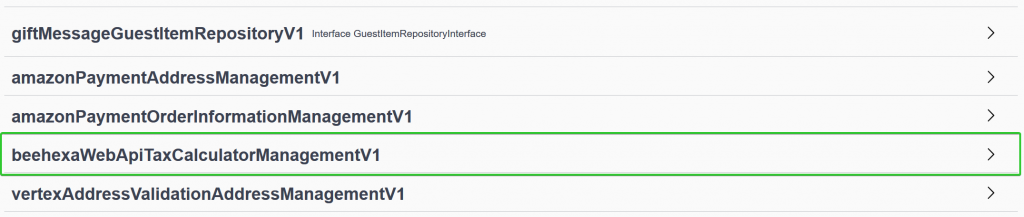
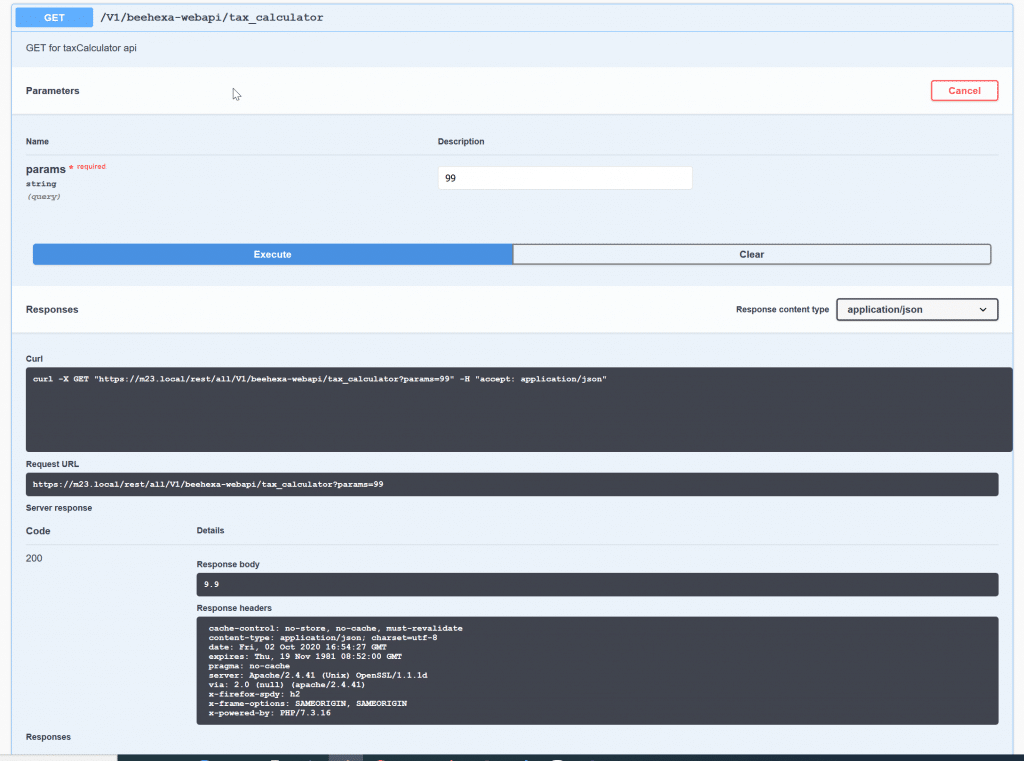
After that, we can do simple testing for this tax calculator API with CURL.
Request URL
https://m23.local/rest/all/V1/beehexa-webapi/tax_calculator?params=99curl -X GET "https://m23.local/rest/all/V1/beehexa-webapi/tax_calculator?params=99" -H "accept: application/json"Response Body:
9.9Response Header
cache-control: no-store, no-cache, must-revalidate content-type: application/json; charset=utf-8 date: Fri, 02 Oct 2020 16:54:27 GMT expires: Thu, 19 Nov 1981 08:52:00 GMT pragma: no-cache server: Apache/2.4.41 (Unix) OpenSSL/1.1.1d via: 2.0 (null) (apache/2.4.41) x-firefox-spdy: h2 x-frame-options: SAMEORIGIN, SAMEORIGIN x-powered-by: PHP/7.3.16 You can see full detail in the picture below:
Last updated: